
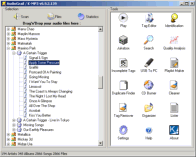
 AudioGrail is a tool to manage and rename your MP3 files. You can rename files based on FreeDB album information and automatically apply ID3 tags (v1 and v2). In addition, you can create export lists of your audio files, perform bulk file name cleanups (convert spaces, capitalize etc.), create playlists and more.AudioGrail (Formerly K-MP3) is the swiss army knife for everthing that is related to audio files (MP3, MPC, OGG...). It can very easily rename and tag (tag: info such as artist name, album, track title) your files automatically. It can also analyse quality, organize files on your system, find duplicated files and improve your everydays audio experience .The user interface of the program is standard. You can add audio tracks to the list by using the file browser or the "drag and drop" function.
So, you can view a file selection and statistics (total files, size and duration), as well as play a particular song in the default media player.
Furthermore, you can use a tag editor (title, artist, album, year, track number, genre, comments) and identification tool (compare the contents of an album with an online database).
But you can also use a jukebox tool, search box, quality analyzer (e.g. bitrate, sample frequency rate) and enable AudioGrail to look for incomplete tags.
In addition, you can transfer audio files from the USB to the PC, generate a playlist with all the current files, find duplicate files in an album in order to erase them and keep the originals only, as well as burn data to disc.
Moreover, you can use a cleaner (e.g. merge multiple spaces, enable character replacement for files and tags), tag remover (for ID3v1, ID3v2, APEv2 and Vorbis comments), organizer (e.g. automatic rename, enable restructuring) and lister (create a TXT or CSV file).
In the "Settings" menu, you can configure the database server and proxy settings, set a password, enable to minimize to system tray and to check for updates, set file associations, select preferred language, and more.
AudioGrail features :-
- Supports : MP3, OGG, MPC, APE, AAC, FLAC and WavPack files.
- Automatically Albums Ranaming & Tagging (ID3Tag V1 & V2 tags, Vorbis (Ogg) comments and APEv2 tags are supported) Powered by FreeDB.
- One-by-one tag editor with queue (for multiple files edition).
- Audio files To Audio CD burning capabilities.
- Files Names Normalizer (Case Standardization...)
- Tags Normalizer (Case Standardization...)
- Mass Tags Remover
- Files Organizer (Mass Tag To Name / Move To Folder)
- Duplicate Files Finder
- Playlist Creator & Analyser (Supported Formats : m3u, pls, xpl)
- Files Lister (Supported Formats : Raw listing, Coma Separated Values, SQL, XML)
- Incomplete Tags Finder.
- Quality Analyser.
- Internationalization support.
- ... And much more !
Comparision Between AudioGrail Free / AudioGrail Expert
| AudioGrail "Free" | AudioGrail "Expert" | |
| Adware | NO ! | NO ! |
| Access to all tools | yes | yes |
| Maximum simultaneous files | 30 | unlimited |
| Internationalization support | yes | yes |
| Technical support | yes | prioritary |
View Online Tutorial From Here
Giveaway:-
U can get this software free of cost.With cooperation with Kc software We can offer Five(5) Licences Of this amazing software. .TO get U have to Follow the following steps:
OWEN
SIDDXX
Plz Comment by Following The below link..as we are facing problem when doing randomizer Bcz Your comments are Not Showing In main page....so plz comment in the Following page Link Below:
http://allforsoftwarenews.blogspot.in/2012/09/contest-27-audiograil-k-mp3-expert-five.html


